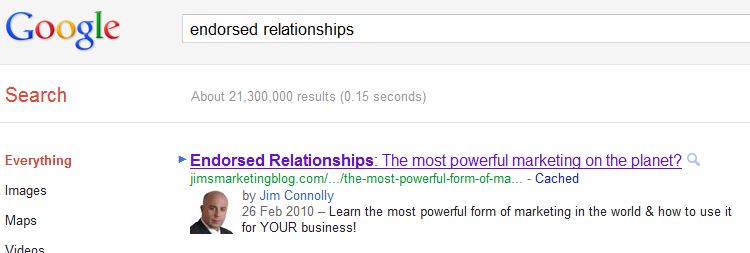
A number of readers have noticed that whenever a post from this blog shows up in Google’s search results, Google displays a photo of me next to it (see above). People are emailing me more and more, asking how I did it, so here goes.
I need to start by saying that I didn’t do it. Google did! This is really important. Even if you follow the steps in the guide I am about to share, there’s no guarantee it will work for you. According to Google:
This feature is being rolled out gradually, and ranking will be implemented algorithmically, so author information will not always display in search results.
So, this may or may not work for you. Currently, I know just a few bloggers other than myself who has had the feature activated by Google. Every other example I see comes from huge sites like mashable and a-list bloggers like Robert Scoble.
Why are Google attaching “author information” to Google search results?
There is a huge issue right now, with people stealing other people’s content and claiming it as their own. Thanks to this new author information service from Google, it will be easier for people to identify the initial or original source of a blog post or article. In essence, when you see that photo show up in your search results, it means Google are verifying that the blog post was written by that person.
If you look closely at the image above, you will see that next to my photo are the words “by Jim Connolly.” If you then click on my name in the search results, it takes you to my Google+ Profile. By the way, you can join me on Google+ here!
For bloggers like myself, whose content is used without attribution on lots of other sites, this author information allows people to find the original source. Within minutes of my posts being published here, they start appearing on other blogs; something known as content scraping. This is an effort by Google, to help match the correct blogger (or author as they call us) to the correct post. Most of my posts are scraped around a dozen times, meaning there are lots of versions of my work out there, often attributed to people who simply scraped them.
How does Google Authoring work?
The idea is actually extremely simple. You link from your blog (or your website), to your Google Profile and then, you link from your Google Profile back to your blog. This reciprocal linking verifies that the owner of that Google Profile is also the (or an) author on that blog. If you own a multi authored blog it works too. You just need your bloggers to link from their Google Profile, to their author page on your blog. Once that process is completed, a circle is created, allowing Google to confidently identity you as the rightful author of your own work, in their search results.
Whilst the idea is extremely simple, the process is currently a little tricky. Rather than try and explain it here, I’d like you to read the instructions from Google, which I followed. I also recommend you watch the short video on that page.
Then what?
Once you have followed the instructions, check that you have done it correctly using Google’s Rich Snippets Testing Tool. This tool is extremely useful and will show you if the code is working and what your blog’s listing will look like in Google’s SERPS (search engine results page), AFTER they have activated it. To use the Rich Snippets Testing Tool, simply paste the URL (address) of one of your blog posts into it and press the preview button. It’s that simple.
Then, if everything looks OK and you see your photo in the preview, it’s a matter of waiting!
Sadly, I don’t know people at Google who can fast-track your site and I am not the guy to help you if you try this and find it doesn’t work; so please, no technical questions in the comments. I just followed the instructions and it worked for me.
Is it worth it?
Yes. It’s useful for people to know that they are reading something, where there is a verified connection between the author and the content. I have also seen a significant increase in Google search traffic since the author information was activated. This makes sense as anyone searching Google, who knows who I am, will see my photo next to a search result and be more likely to click it. Photo’s act a lot faster than text and give an immediate signal.
I applaud Google’s work in helping bloggers to be credited with authorship of their own work. I look forward to seeing your smiling faces staring at me when I’m next searching!
Make more sales, boost your profits and grow an amazing business. How? This has already helped hundreds of small business owners → Click here